Blog & Magazine Website Templates
Build beautiful blogs and digital magazines with editorial layouts, category navigation, featured posts, newsletter capture, and reader-focused typography that keeps people reading.
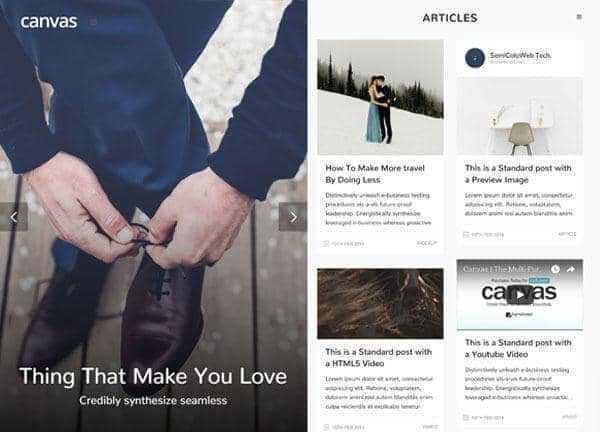
Example output
40
industry templates
1,938+
prompt templates
About 3 minutes
to build a page
Designing a blog & magazine website: what works
Blog and magazine websites live and die by two metrics: time on site and return visits. Design choices must serve readability above all else: if reading an article is cognitively tiring, visitors won't finish and won't return. Beyond readability, the layout must efficiently surface new content and encourage discovery across your content library.
Typography as the Primary Design Element
Content websites must prioritise reading comfort above visual flair. Choose a serif or highly-legible sans-serif for body copy at 16 to 18px with 1.6 to 1.8 line height. Display headlines can be more expressive: a bold editorial serif creates magazine-like authority. Limit typeface combinations to two: one display, one body.
Content Discovery Architecture
Category navigation, related posts, and 'what to read next' sections are critical for increasing pages-per-session. Readers who land from search need clear signposting to related content. A prominent category bar, tag cloud, or 'more like this' section can double average session depth.
Hero and Featured Content Hierarchy
The homepage hero should feature your most recent or most important piece prominently: large image, compelling headline, deck. Below it, mix a featured stories section with a latest posts grid. Magazine-style layout variety (featured + grid + list) prevents monotony and allows different types of content to be surfaced differently.
Newsletter and Subscription Conversion
Email subscribers are 6x more likely to read content than social followers. Place newsletter signup prompts at the end of each article, in the sidebar, and as a mid-article inline prompt after 2 to 3 paragraphs. Offer a specific value proposition ('Weekly curated reads on [topic]') rather than generic 'subscribe for updates'.
Ready to build?
Describe your blog & magazine website in plain English and Canvas Builder builds it, ready to edit and export. No design skills needed.
5 design tips for blog & magazine websites
Use strong featured images consistently
Every post needs a compelling featured image: it's the primary visual entry point in category grids and social shares. Establish a visual house style for featured images (illustration style, photo treatment, typography overlay) for brand cohesion across your content library.
Implement a table of contents for long articles
For long-form content (1,500+ words), a sticky table of contents improves navigation, reduces bounce, and signals to Google that the content is structured and comprehensive. It's one of the quickest technical wins for content SEO.
Show author bylines and bios
Author pages with bio, photo, and linked article archive build expertise signals (Google E-E-A-T) and give readers a relationship to your writing team. Named, credentialed authors outperform anonymous 'Staff Writer' attribution for both trust and SEO.
Optimise for newsletter conversions
The most valuable conversion on a blog is an email subscriber. Place newsletter CTAs at the end of high-traffic articles and as exit-intent popups. A specific value proposition ('Join 14,000 marketers reading our weekly breakdown') converts far better than 'Subscribe to our newsletter'.
Load time is readership time
Every second of load time above 3 seconds costs 7% of readers. Optimise all images (WebP format, lazy loading), minimise CSS/JS, and use a CDN for global audiences. Google's Core Web Vitals directly affect your search ranking, fast blogs rank higher.
Try this prompt
Use it as it is, or change the names, colours and sections to match your business.
Create a full-page editorial blog website for 'The Gradient', a technology and design publication. Use a clean white background with black editorial typography and a single accent colour of vibrant orange. Include a clean full header with category navigation (Design, Technology, Business, Culture). Hero section with a large featured article card. A 3-column editorial grid for latest posts. A newsletter signup section with subscriber count. Author profile cards. And a sidebar-style featured categories section.Frequently asked questions
What pages does a blog website need?
Core pages: Home (editorial homepage), individual Post pages, Category/Tag archive pages, About, Author Profile pages, Contact, and Newsletter Subscription. A 'Start Here' or 'Best Of' curation page is excellent for directing new readers to your most valuable content.
How often should I publish on my blog?
Quality over frequency. One well-researched, genuinely useful 1,500+ word article per week outperforms daily 300-word posts for SEO and audience building. Consistency matters more than frequency: missing weeks damages subscriber retention and search crawl frequency.
How do I monetise a blog?
Primary monetisation models: display advertising (Google AdSense, Mediavine, AdThrive at scale), affiliate marketing, sponsored content/brand partnerships, email newsletter sponsorships, digital products (courses, templates), and membership/subscription tiers. Diversify revenue streams rather than relying solely on display ads.
What's the best way to grow a blog audience?
The most reliable channels: (1) SEO, create comprehensive content targeting specific search queries in your niche, (2) Newsletter, build and serve an email list consistently, (3) Social, one platform where your audience exists, mastered deeply, not all of them superficially, (4) Collaborations, guest posts and podcast appearances in adjacent communities.
Should my blog have a paid subscription tier?
If you have a highly engaged audience with specific professional or hobbyist interests, a paid subscription makes sense. Substack's model (free + paid tiers) has proven viable at every scale. The question isn't audience size: it's willingness to pay for exclusivity, depth, or premium access to you specifically.
Related templates
Agency Website Templates
Build agency websites that impress prospects and win pitches: featuring case study showcases, service capabilities, team culture, and results-focused conversion design.
View templates →Education & eLearning Website Templates
Build education and online learning websites that inspire enrolment, with course catalogues, instructor profiles, learning outcomes, and student success stories.
View templates →Online Course Website Templates
Build online course websites that convert, with compelling curriculum previews, instructor credibility sections, cohort countdown timers, and student transformation testimonials.
View templates →Build your blog & magazine website in minutes
Describe what you need. Canvas Builder writes production-ready Bootstrap 5 HTML on the Canvas design system, ready to publish or export.