Online Course Website Templates
Build online course websites that convert, with compelling curriculum previews, instructor credibility sections, cohort countdown timers, and student transformation testimonials.
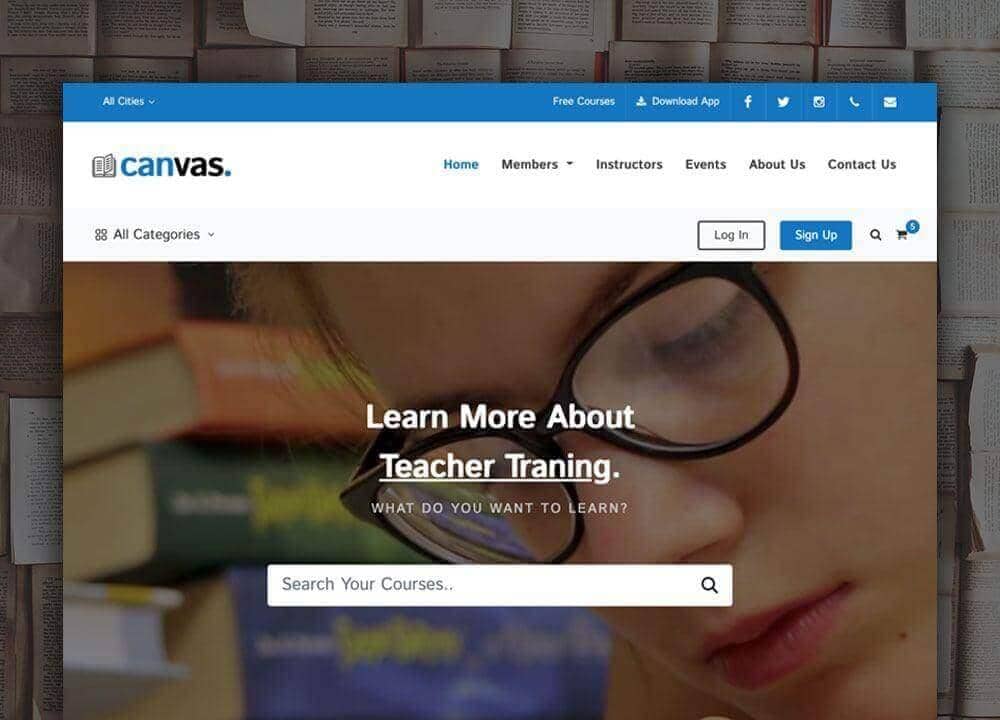
Example output
40
industry templates
1,938+
prompt templates
About 3 minutes
to build a page
Designing an online course website: what works
Online course landing pages are among the most conversion-tested pages on the internet: the direct response copywriting and conversion design principles that govern them are extensively documented. The challenge for course creators is applying these principles with genuine authenticity and specificity to their specific topic and audience.
Headline and Transformation Promise
The course landing page headline must name the outcome, not the method: 'Get Your First 100 Freelance Clients in 90 Days' rather than 'The Freelance Business Development Course'. Outcomes that are specific, achievable within a defined timeframe, and relevant to the student's dream result outperform vague capability descriptions by large margins in A/B tests.
Curriculum Depth and Preview Content
A detailed curriculum outline (all modules, each module's lessons and key takeaways) signals that the course is comprehensive and well-structured. Visitors who review the full curriculum spend significantly longer on page and convert at higher rates. Include a free preview lesson or module: once a student experiences value, purchase intent increases dramatically.
Instructor Authority Architecture
Students don't just buy a course: they buy access to the instructor's accumulated experience. A compelling instructor section should include: professional bio with relevant experience, recognisable company logos, media appearances, student count, and a personal story connecting the instructor's journey to the course topic. Video introductions from the instructor are among the highest-converting elements on course pages.
Social Proof Density and Specificity
Online course pages require more social proof than almost any other product category. Mix: star ratings with total student count, written testimonials with photos and LinkedIn links, video testimonials for highest-priced tiers, case studies with specific student outcomes, and a 'Who this is for' section that makes the ideal student feel seen. Testimonials that describe a specific concern the student had before enrolling, and how it was resolved, are among the most persuasive.
Ready to build?
Describe your online course website in plain English and Canvas Builder builds it, ready to edit and export. No design skills needed.
5 design tips for online course websites
Lead with a student transformation, not the curriculum
Open your course page with a specific student story: their before state, their journey through the course, and their tangible outcome. This 'hero's journey' narrative builds identification and motivation before you explain what's actually in the course.
Use a countdown timer for cohort launches
Cohort-based courses with fixed enrolment periods benefit enormously from genuine countdown timers to enrolment close. This urgency mechanism is among the highest-converting elements on course landing pages, live countdown timers increase conversion rates by 20 to 40% for limited-cohort courses.
Offer a 30-day money-back guarantee
A 30-day unconditional money-back guarantee typically reduces refunds (due to reduced buyer anxiety and sunk cost psychology) while dramatically increasing initial purchase conversion for courses above $200. The guarantee signal increases purchase comfort more than the actual refund rate justifies concern.
Create a detailed 'Is this right for me?' section
A 'Who this is for' and 'Who this is NOT for' section with specific, honest descriptions pre-qualifies students, reduces refunds from poor-fit purchases, and paradoxically increases conversion by making students who do match feel they've found exactly what they needed.
Price anchoring through tier structure
A 'Self-Paced', 'Live Cohort', and 'VIP Coaching' tier structure (even if most students will choose the middle option) uses price anchoring to make the target tier feel like exceptional value relative to the premium option.
Try this prompt
Use it as it is, or change the names, colours and sections to match your business.
Create a full-page online course landing page for 'The Freelance Accelerator', a 10-week programme helping designers land their first $5k+ freelance clients. Use a bold, energetic palette of deep purple and vibrant lime green. Hero with a transformation headline 'Land Your First $5K Freelance Client in 90 Days', student count social proof, and enrolment countdown timer. A student transformation story section. Full curriculum outline with expandable modules. Instructor bio with credentials. Pricing tiers (Self-Paced, Live Cohort, VIP). Extensive testimonials section. And a strong money-back guarantee section.Frequently asked questions
What sections should an online course landing page have?
The essential sections in order: Headline (outcome promise), Transformation Story or Pain Point, About the Course (brief overview), Curriculum Outline (expandable), Instructor Bio, Student Testimonials and Results, Who It's For / Who It's Not For, What's Included (deliverables), Pricing and Payment Options, Guarantee, FAQ, and Final CTA.
How do I price my online course?
Pricing should reflect the value of the outcome, not the production cost. A course that helps students land a $30K salary increase can price at $2,000+ if the transformation is credibly demonstrated. Most beginners underprice. Test higher price points: conversion rates often don't fall as dramatically as feared, and revenue per visitor increases substantially.
Should online courses use evergreen or live launch models?
Both work: they serve different creator types and audiences. Live launches (limited enrolment, cohort-based, countdown timer) create urgency and community but require significant energy per launch. Evergreen (always-open, automated sales funnel) provides passive revenue but requires a robust content marketing machine to drive consistent traffic.
What platforms should I host my online course on?
Kajabi (premium, all-in-one), Teachable (beginner-friendly, good for text + video), Thinkific (strong customisation), Podia (includes membership + digital products), and Maven (cohort-based, community-focused) are the primary options. Platform choice depends on course format, tech comfort, and whether community features are important.
How do I build an audience before launching a course?
The most reliable pre-launch audience building: (1) Email list via lead magnet related to your course topic, (2) YouTube or podcast content demonstrating your teaching quality, (3) Twitter/LinkedIn thought leadership in your niche, (4) Beta cohort at a discount to generate initial testimonials and validate demand, (5) Waitlist landing page with a launch date to build anticipation.
Related templates
Education & eLearning Website Templates
Build education and online learning websites that inspire enrolment, with course catalogues, instructor profiles, learning outcomes, and student success stories.
View templates →Startup Website Templates
Build startup websites that attract users, investors, and press: featuring product demos, founder credibility, waitlist capture, and clean modern design that signals serious execution.
View templates →Blog & Magazine Website Templates
Build beautiful blogs and digital magazines with editorial layouts, category navigation, featured posts, newsletter capture, and reader-focused typography that keeps people reading.
View templates →Build your online course website in minutes
Describe what you need. Canvas Builder writes production-ready Bootstrap 5 HTML on the Canvas design system, ready to publish or export.