
The pet e-commerce market is booming — and your pet subscription box website has about four seconds to convince a visitor they’ve found something worth paying for every month. Here’s how to design one that actually converts.
⚡ Key Takeaways
- Your hero section must answer what it is, what’s inside, and how much within the first viewport.
- Social proof (photos of real pets + unboxing clips) outperforms studio photography for conversion.
- Tiered pricing cards with a highlighted “Best Value” plan are the single highest-ROI layout change you can make.
- A subscription pet website in 2026 must be mobile-first — over 68% of pet product traffic arrives via phone.
- FAQ sections reduce pre-checkout anxiety and cut support tickets simultaneously.
- Bootstrap 5 components let you ship a polished pet box landing page fast, without writing everything from scratch.
Designing a pet subscription box website isn’t the same as building a standard e-commerce storefront. You’re not selling a one-time product — you’re selling a recurring relationship. Visitors need to trust you before they hand over their card details, and that trust has to be established through layout, copy, social proof, and frictionless UX — all working in concert.
In 2026, the bar is higher than ever. Competitors have polished animations, unboxing reels embedded directly in hero sections, and quiz-style personalisation flows that feel closer to an app than a website. This guide breaks down what’s actually working on the best pet box landing pages right now, with real code you can drop straight into your project.
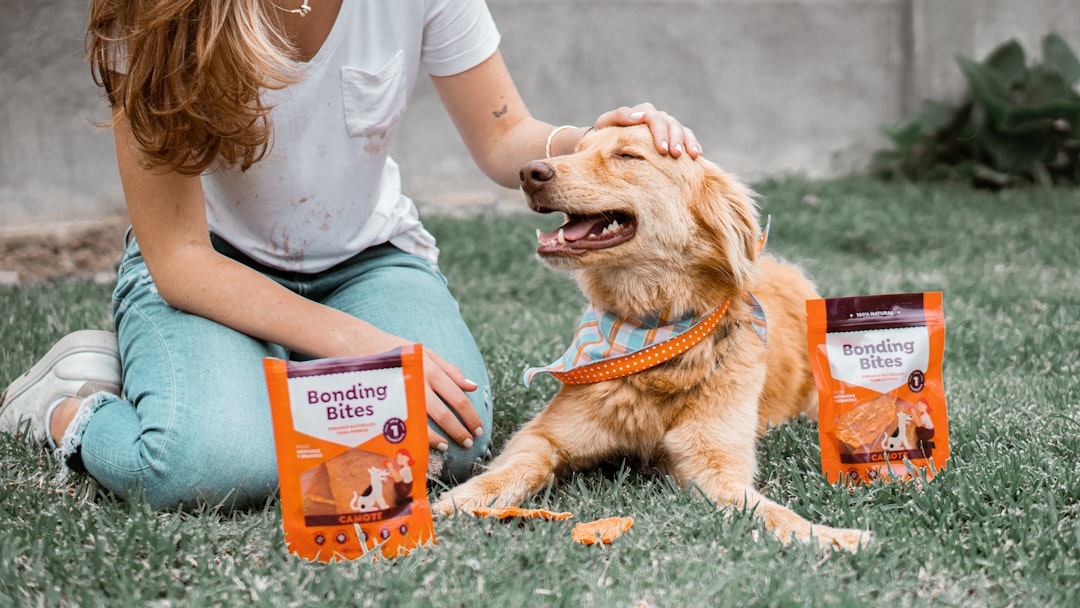
Hero Section Design That Hooks Pet Parents Immediately
Your hero is doing heavy lifting. It has to communicate your brand personality, show the physical product, plant a price anchor, and push toward a CTA — all above the fold.
The pattern that wins in 2026: a split layout with a product photo or short looping video on one side, and a tight value proposition + primary CTA on the other. Keep the copy scannable. “Monthly boxes tailored to your dog’s size, breed, and quirks. From $29/month.” That’s it.
<!-- Bootstrap 5 split hero for a pet subscription box website -->
<section class="hero-split py-6 bg-soft-cream">
  <div class="container">
    <div class="row align-items-center g-5">

      <!-- Copy column -->
      <div class="col-lg-6">
        <span class="badge bg-warning text-dark mb-3">🐾 New boxes ship every 1st</span>
        <h1 class="display-4 fw-bold lh-sm">
          Surprise Your Dog. Every. Single. Month.
        </h1>
        <p class="lead mt-3 text-muted">
          Curated treats, toys, and gear — personalised to your pup's breed and size.
          From <strong>$29/month</strong>. Cancel anytime.
        </p>
        <a href="#pricing" class="btn btn-primary btn-lg mt-4 px-5 rounded-pill">
          Start My Box →
        </a>
        <p class="text-muted small mt-2">⭐ 4.9/5 from 12,400+ subscribers</p>
      </div>

      <!-- Image column -->
      <div class="col-lg-6 text-center">
        <img
          src="assets/img/hero-box-open.webp"
          alt="Open pet subscription box with treats and toys"
          class="img-fluid rounded-4 shadow-lg"
          width="560"
          height="420"
          loading="eager"
        />
      </div>

    </div>
  </div>
</section>
Note the loading="eager" on the hero image — LCP (Largest Contentful Paint) matters for SEO, and lazy-loading your above-the-fold image is a common mistake that tanks Core Web Vitals scores.
Social Proof That Actually Converts Pet Box Shoppers
Studio photography looks beautiful in mockups. Real dogs tearing into boxes converts. The most effective social proof on a subscription pet website in 2026 combines three elements:
- UGC photo grid — pull from Instagram or TikTok, display in a masonry layout
- Star rating + review count — pinned near the CTA, not buried in a reviews tab
- Short video testimonial — 15–30 seconds, autoplay muted, shows the unboxing moment
For the review strip, a horizontally scrolling card row works well on mobile and keeps the section compact on desktop:
<!-- Horizontal scrolling review strip -->
<section class="reviews-strip py-5 bg-white">
  <div class="container">
    <h2 class="text-center fw-semibold mb-4">What Pet Parents Are Saying</h2>
    <div class="d-flex gap-3 overflow-auto pb-2" style="scroll-snap-type: x mandatory;">

      <!-- Review card -->
      <div class="card border-0 bg-light rounded-4 p-4 flex-shrink-0"
           style="width: 300px; scroll-snap-align: start;">
        <div class="d-flex align-items-center mb-3">
          <img src="assets/img/reviewer-1.webp" class="rounded-circle me-2"
               width="44" height="44" alt="Reviewer photo">
          <div>
            <p class="fw-bold mb-0 small">Sarah M.</p>
            <p class="text-warning mb-0 small">★★★★★</p>
          </div>
        </div>
        <p class="text-muted small mb-0">
          "Biscuit literally sprints to the door on delivery day now.
          Best $39 I spend all month."
        </p>
      </div>

      <!-- Repeat card for each review... -->

    </div>
  </div>
</section>
This pattern pairs naturally with Bootstrap 5’s card system — if you want to explore more card layout options, 8 Bootstrap 5 Card Components You Should Be Using Right Now is worth a read.
Pricing Section: The Make-or-Break Moment on a Pet Box Landing Page
Subscription pricing is inherently more complex than a one-off purchase. Visitors need to understand billing cycles, commitment length, and cancellation policy — and they need to understand all of it before clicking Buy.
The layout that consistently outperforms in 2026: three-tier cards with a visually differentiated “Best Value” plan. A billing toggle (monthly vs. annual) adds perceived flexibility without cluttering the UI.
<!-- Pricing toggle + three-tier cards -->
<section id="pricing" class="pricing-section py-6 bg-soft-cream">
  <div class="container text-center">
    <h2 class="fw-bold mb-2">Pick Your Perfect Plan</h2>
    <p class="text-muted mb-4">Pause or cancel anytime. No tricks.</p>

    <!-- Billing toggle -->
    <div class="d-inline-flex align-items-center gap-3 mb-5 bg-white rounded-pill px-4 py-2 shadow-sm">
      <span class="small fw-semibold">Monthly</span>
      <div class="form-check form-switch mb-0">
        <input class="form-check-input" type="checkbox" id="billingToggle">
      </div>
      <span class="small fw-semibold">Annual <span class="badge bg-success">Save 20%</span></span>
    </div>

    <div class="row g-4 justify-content-center">

      <!-- Pup Plan -->
      <div class="col-md-4">
        <div class="card border-0 rounded-4 p-4 h-100 shadow-sm">
          <h3 class="h5 fw-bold">🐶 Pup Plan</h3>
          <p class="display-6 fw-bold my-3">$29<span class="fs-6 text-muted">/mo</span></p>
          <ul class="list-unstyled text-start text-muted small">
            <li class="mb-2">✅ 4–5 items per box</li>
            <li class="mb-2">✅ Breed-matched treats</li>
            <li class="mb-2">✅ Free shipping</li>
          </ul>
          <a href="/subscribe/pup" class="btn btn-outline-primary w-100 mt-auto rounded-pill">Start Pup Plan</a>
        </div>
      </div>

      <!-- Alpha Plan (Best Value - highlighted) -->
      <div class="col-md-4">
        <div class="card border-0 rounded-4 p-4 h-100 shadow-lg bg-primary text-white">
          <span class="badge bg-warning text-dark mb-2 align-self-start">⭐ Best Value</span>
          <h3 class="h5 fw-bold">🦴 Alpha Plan</h3>
          <p class="display-6 fw-bold my-3">$49<span class="fs-6 opacity-75">/mo</span></p>
          <ul class="list-unstyled text-start small">
            <li class="mb-2">✅ 7–9 items per box</li>
            <li class="mb-2">✅ Personalised toy selection</li>
            <li class="mb-2">✅ Member-only discounts</li>
          </ul>
          <a href="/subscribe/alpha" class="btn btn-light text-primary w-100 mt-auto rounded-pill fw-bold">Start Alpha Plan</a>
        </div>
      </div>

      <!-- Pack Plan -->
      <div class="col-md-4">
        <div class="card border-0 rounded-4 p-4 h-100 shadow-sm">
          <h3 class="h5 fw-bold">🐾 Pack Plan</h3>
          <p class="display-6 fw-bold my-3">$79<span class="fs-6 text-muted">/mo</span></p>
          <ul class="list-unstyled text-start text-muted small">
            <li class="mb-2">✅ 12+ premium items</li>
            <li class="mb-2">✅ Multi-pet customisation</li>
            <li class="mb-2">✅ Priority support</li>
          </ul>
          <a href="/subscribe/pack" class="btn btn-outline-primary w-100 mt-auto rounded-pill">Start Pack Plan</a>
        </div>
      </div>

    </div>
  </div>
</section>
For a deeper look at pricing table patterns that lift conversions, see Canvas Pricing Tables: Design Options That Convert Visitors.
Personalisation Quiz Flow: The 2026 Retention Weapon
The biggest shift in subscription pet website design between 2024 and 2026 is the rise of the onboarding quiz as a primary CTA. Instead of sending users straight to a checkout form, the best brands route visitors through a 3–5 step pet profile quiz first.
Why it works: it creates investment before purchase. By the time someone has answered “What’s your dog’s breed?”, “How playful is she?” and “Any allergies?”, they feel like the box is already theirs. Conversion rates on quiz-gated flows consistently outperform direct CTAs by 20–35% in A/B tests.
The quiz itself doesn’t need complex JavaScript. A simple multi-step form with hidden sections works fine for most setups:
<!-- Multi-step pet quiz (CSS-driven, no JS framework needed) -->
<style>
  .quiz-step { display: none; }
  .quiz-step.active { display: block; }
</style>

<div class="quiz-container card border-0 rounded-4 shadow p-5 mx-auto" style="max-width: 560px;">

  <!-- Step 1 -->
  <div class="quiz-step active" id="step-1">
    <p class="text-muted small mb-2">Step 1 of 3</p>
    <h3 class="fw-bold">What kind of pet are you shopping for?</h3>
    <div class="d-flex gap-3 mt-4">
      <button class="btn btn-outline-primary flex-fill py-3 rounded-4">🐶 Dog</button>
      <button class="btn btn-outline-primary flex-fill py-3 rounded-4">🐱 Cat</button>
    </div>
  </div>

  <!-- Step 2 -->
  <div class="quiz-step" id="step-2">
    <p class="text-muted small mb-2">Step 2 of 3</p>
    <h3 class="fw-bold">How big is your dog?</h3>
    <div class="d-flex flex-column gap-2 mt-4">
      <button class="btn btn-outline-secondary py-3 rounded-4">Small (under 20 lbs)</button>
      <button class="btn btn-outline-secondary py-3 rounded-4">Medium (20–50 lbs)</button>
      <button class="btn btn-outline-secondary py-3 rounded-4">Large (50+ lbs)</button>
    </div>
  </div>

  <!-- Step 3: Email capture -->
  <div class="quiz-step" id="step-3">
    <p class="text-muted small mb-2">Step 3 of 3</p>
    <h3 class="fw-bold">Where should we send your box details?</h3>
    <input type="email" class="form-control form-control-lg mt-4 mb-3" placeholder="Your email address">
    <button class="btn btn-primary btn-lg w-100 rounded-pill">See My Personalised Box →</button>
    <p class="text-muted small text-center mt-2">No spam. Just your box.</p>
  </div>

</div>

<script>
  function goToStep(n) {
    document.querySelectorAll('.quiz-step').forEach(el => el.classList.remove('active'));
    document.getElementById('step-' + n).classList.add('active');
  }
</script>
Mobile-First Layout: Non-Negotiable for a Subscription Pet Website in 2026
Over 68% of pet product e-commerce traffic is mobile. Your pet box landing page must be designed phone-first, then scaled up to desktop — not the other way around.
Key mobile considerations for subscription sites:
- Sticky bottom CTA bar — keeps “Subscribe Now” visible while users scroll through content
- Touch-friendly tap targets — minimum 48×48px for all buttons and interactive elements
- Compressed image delivery — use
.webpwithsrcsetfor hero and product images - Single-column pricing — stack your three pricing tiers vertically on mobile, with the best-value plan first
<!-- Sticky mobile CTA bar -->
<div class="d-lg-none fixed-bottom bg-white border-top px-4 py-3 shadow-lg">
  <div class="d-flex align-items-center justify-content-between gap-3">
    <div>
      <p class="fw-bold mb-0 small">Alpha Plan — $49/month</p>
      <p class="text-muted mb-0 small">Cancel anytime</p>
    </div>
    <a href="#pricing" class="btn btn-primary rounded-pill px-4 flex-shrink-0">
      Subscribe
    </a>
  </div>
</div>
For a thorough guide on Bootstrap 5 responsive layout mechanics, Bootstrap 5 Breakpoints: How to Build Truly Responsive Layouts covers the exact breakpoint logic you’ll need.
Trust Signals and Conversion Details That Separate Winners from the Rest
The final 20% of conversion rate optimisation on a pet subscription box website comes from a collection of small trust signals that collectively eliminate the last objections before checkout:
- Cancellation guarantee — make it prominent, not buried in footer fine print (“Cancel in one click. No phone calls.”)
- Shipping timeline — “Ships on the 1st of every month” reduces “when will I get it?” anxiety
- Pet guarantee — “Your pet doesn’t love a product? We’ll replace it.” This is a high-trust differentiator
- Payment security badges — Stripe, PayPal, and SSL badges near the checkout button
- As seen in press strip — even small press mentions (blogs, podcasts) add legitimacy
A well-designed FAQ section handles objections at scale. Use Bootstrap’s accordion component to keep it compact — and consider it a conversion tool, not just a support page. For interactive component patterns without heavy JavaScript, Bootstrap 5 Accordion and Tabs: Interactive Content Without JavaScript is exactly what you need.
<!-- Trust badge strip -->
<section class="trust-strip py-4 border-top border-bottom">
  <div class="container">
    <div class="row g-3 text-center">
      <div class="col-6 col-md-3">
        <p class="mb-0 small fw-semibold">🔒 Secure Checkout</p>
        <p class="text-muted small mb-0">SSL encrypted</p>
      </div>
      <div class="col-6 col-md-3">
        <p class="mb-0 small fw-semibold">📦 Ships Every Month</p>
        <p class="text-muted small mb-0">On the 1st, always</p>
      </div>
      <div class="col-6 col-md-3">
        <p class="mb-0 small fw-semibold">❌ Cancel Anytime</p>
        <p class="text-muted small mb-0">One click, no calls</p>
      </div>
      <div class="col-6 col-md-3">
        <p class="mb-0 small fw-semibold">🐾 Happiness Guarantee</p>
        <p class="text-muted small mb-0">Or we replace it</p>
      </div>
    </div>
  </div>
</section>
Frequently Asked Questions
.webp images, lazy-load everything below the fold, and keep your initial JavaScript bundle lean. A good HTML template with optimised assets can get you to a 90+ Lighthouse score out of the box.
If you’re working with the Canvas HTML Template and want to generate production-ready layouts faster, try Canvas Builder free and see how much time you save on every project.