Event & Conference Website Templates
Create event and conference websites that drive registrations, with speaker showcases, session schedules, ticket tiers, and urgency-building countdown elements.
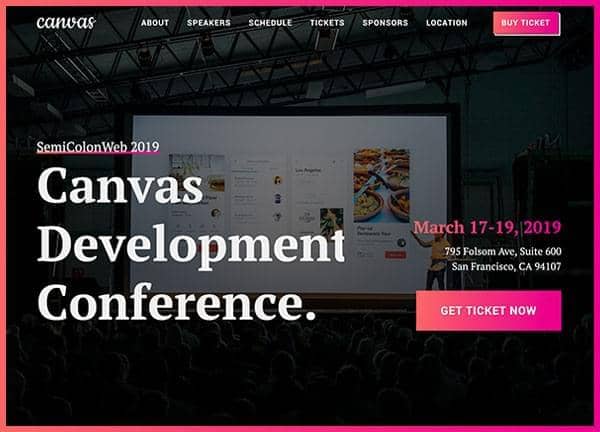
Example output
40
industry templates
1,938+
prompt templates
About 3 minutes
to build a page
Designing an event & conference website: what works
Event websites are deadline-driven conversion machines. Unlike most websites, events have a built-in urgency mechanism, a fixed date, that smart designs amplify through countdown timers, early bird pricing windows, and capacity-based scarcity. The challenge is balancing excitement with informational clarity.
First-Fold Conversion Clarity
Visitors need five things immediately: event name, date, location, what it's about, and how to register. Any design that makes finding these details take more than 5 seconds is costing you registrations. A countdown timer with 'Early Bird ends in X days' is the single most effective urgency element in event design.
Speaker Lineup as Social Proof
For professional conferences and summits, the speaker lineup is often the primary purchase driver. Create dedicated profile sections with professional headshots, titles, company logos, and session titles. If you have marquee speakers, feature them in the hero. If your lineup is strong, it sells the event more effectively than any copy.
Schedule and Session Architecture
A clear, day-by-day or track-based schedule is essential for multi-session events. Filterable by track, speaker, or topic, with the ability to add sessions to a personal agenda. For hybrid events, clearly distinguish between in-person and virtual sessions with visual coding.
Ticket Tier Design Psychology
Create at least three ticket tiers: an accessible entry level, a full-access mid tier, and a premium VIP option. The mid tier should feel like extraordinary value compared to the entry level. Sold-out tiers shown as greyed-out create real social proof and urgency around remaining availability.
Ready to build?
Describe your event & conference website in plain English and Canvas Builder builds it, ready to edit and export. No design skills needed.
5 design tips for event & conference websites
Add a prominent countdown timer
A live countdown timer to the event date (or more effectively, to the end of early bird pricing) is the most consistently impactful conversion element on event websites. Urgency is real when there's a deadline.
Feature sponsor logos prominently
Major sponsor logos in the hero or immediately below it serve dual purposes: they provide social proof about the event's credibility and prestige, and they satisfy sponsor agreement obligations. Use greyscale logos for visual coherence.
Include a FAQ for logistics questions
Venue access, parking, accommodation, dress code, dietary options, networking opportunities: answer these in an expandable FAQ rather than fielding individual emails. A comprehensive FAQ reduces support burden by 40 to 60%.
Make ticket tiers visually distinct
Use colour-coding, size differentiation, and feature list comparison tables for ticket tiers. The 'most popular' tier should be visually elevated (bordered, larger, or on a contrasting background) to guide decision-making.
Create an email capture for sold-out events
When tickets sell out, don't show a static 'Sold Out' message: show a waitlist signup form. Waitlist registrants become first-access buyers for next year's event and maintain engagement year-round.
Try this prompt
Use it as it is, or change the names, colours and sections to match your business.
Create a full-page conference website for 'FutureStack 2026', a technology leadership summit. Use dark charcoal backgrounds with electric blue accents. Include a hero with event date, location (Sydney Opera House), and a countdown timer. Speaker lineup grid with 9 speaker cards (photos, names, titles, companies). A schedule timeline for 2 days. A 3-tier ticket pricing section (General, Professional, VIP). A sponsor logos section. And an FAQ accordion.Frequently asked questions
What pages does an event website need?
Core pages: Home/Landing Page, About the Event, Speakers, Schedule/Programme, Tickets/Registration, Venue & Travel, Sponsors, FAQ, and Contact. Large multi-day conferences benefit from separate pages for workshops, networking events, and accommodation recommendations.
What's the best platform for event ticketing?
Eventbrite is the most widely known and easiest to embed. Tito is popular for developer conferences and has excellent API access. For large corporate events, Cvent provides enterprise-grade registration and CRM integration. Custom checkout works for very high-ticket events where platform fees matter.
How far in advance should I launch an event website?
Launch 3 to 6 months before the event for conferences, 4 to 8 weeks for smaller events. Earlier launches allow more time for early bird conversions and organic SEO to build. An 'interest registration' page can launch even earlier to capture email leads before tickets go on sale.
How do I increase event registrations?
The four most effective tactics: (1) Early bird discounts with a firm deadline, (2) Group discounts for team registrations, (3) Speaker amplification, ask speakers to share with their audience, (4) Retargeting ads to website visitors who didn't convert on first visit.
Should my event website have a separate page for virtual vs in-person attendance?
Yes, for hybrid events. Virtual attendees have different information needs (platform link, timezone, recording access policy) than in-person attendees (venue, parking, accommodation). Creating separate or clearly-tabbed information for each reduces confusion and support queries.
Related templates
Hotel & Hospitality Website Templates
Create hotel and resort websites with immersive photography, room showcases, amenity highlights, and direct booking CTAs that compete with OTAs for every reservation.
View templates →Nonprofit & Charity Website Templates
Build nonprofit and charity websites that inspire action, with compelling mission statements, impact visualisations, donation flows, and volunteer recruitment sections.
View templates →Music & Band Website Templates
Build music and band websites that grow your fanbase, with integrated music players, tour date listings, merch stores, EPK sections, and bold visual design that expresses your sound.
View templates →Build your event & conference website in minutes
Describe what you need. Canvas Builder writes production-ready Bootstrap 5 HTML on the Canvas design system, ready to publish or export.