Nonprofit & Charity Website Templates
Build nonprofit and charity websites that inspire action, with compelling mission statements, impact visualisations, donation flows, and volunteer recruitment sections.
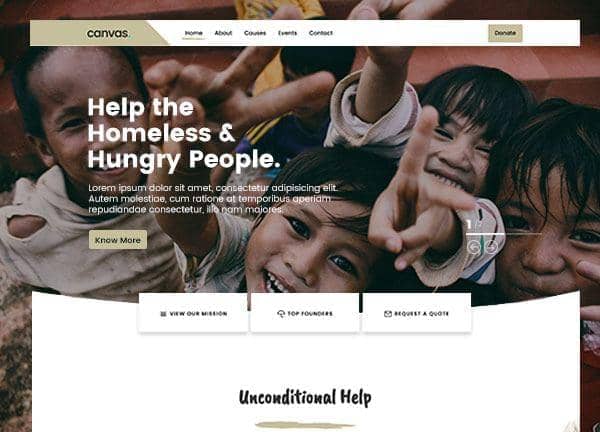
Example output
40
industry templates
1,938+
prompt templates
About 3 minutes
to build a page
Designing a nonprofit & charity website: what works
Nonprofit websites need to do something harder than sell a product: they need to inspire someone to give something without receiving a tangible return. The design must build emotional connection, communicate impact with specificity, establish trust through transparency, and make the act of giving easy and meaningful.
Impact Visualisation and Storytelling
Donors respond to individuals, not statistics. The 'identifiable victim effect' means a story about one specific person moves more donations than statistics about thousands. Lead with human faces, individual stories, and specific outcomes. Use impact counters ('3,842 children fed this year') to add scale once the emotional connection is made.
Donation Flow Design
Every click between donation intent and completed transaction is a drop-off risk. Minimise steps: show preset amounts ($10, $25, $50, $100) with impact descriptions ('$50 provides clean water for one family for a month'). Offer one-time and monthly recurring options prominently. Monthly giving programs generate 5x the annual value of one-time donors.
Transparency and Trust Signals
Donors increasingly research charities before giving. Display your charity registration number, annual reports, financial statements, and recognised accreditations (Charity Navigator rating, ACNC registration, GiveWell recommendation). A 'How we use your donation' breakdown (programme vs overhead) is one of the most requested pieces of information.
Multiple Engagement Pathways
Not every visitor is ready to donate: many want to volunteer, share on social media, attend an event, or advocate. Design clear pathways for each type of engagement. Email list capture ('Stay updated on our impact') is particularly valuable: newsletter subscribers convert to donors at much higher rates than cold visitors.
Ready to build?
Describe your nonprofit & charity website in plain English and Canvas Builder builds it, ready to edit and export. No design skills needed.
5 design tips for nonprofit & charity websites
Lead with one powerful human story
Open with a specific individual's story: a named beneficiary with a photo and outcome. This single storytelling choice has more impact on donation intent than any design element. Facts tell; stories sell.
Show exactly how donations are used
A visual breakdown showing '82 cents of every dollar goes directly to programmes' builds donor trust. Publish your annual financial reports and make them easy to find. Transparency is your most powerful trust builder.
Make monthly giving the default
When offering donation tiers, select the monthly option by default rather than one-time. Monthly donors are 90% more likely to continue giving for multiple years and have 5x the lifetime value. A small design choice that massively impacts long-term fundraising.
Create an urgent appeal for seasonal giving
Year-end giving accounts for 30% of annual nonprofit donations. Create dedicated campaign landing pages with specific funding goals, progress bars, and matched giving offers for major seasonal giving periods.
Feature your charity rating prominently
If you have a 4-star Charity Navigator rating, a Platinum Candid Seal, or similar accreditation, display it prominently near your donation CTA. Third-party endorsement dramatically increases donor confidence in new visitors.
Try this prompt
Use it as it is, or change the names, colours and sections to match your business.
Create a full-page nonprofit website for 'Bright Horizons Foundation', an education charity for underprivileged children. Use warm orange and clean white tones with deep navy accents. A hero section with a powerful child photograph, mission statement, and prominent donation CTA with a progress bar showing the current fundraising goal. An impact counter strip (12,400 children helped, 340 schools supported, 28 countries). Individual impact story cards. A 'Ways to Give' section with monthly/one-time options and impact descriptions. Volunteer CTA. And transparency section with charity accreditations.Frequently asked questions
What pages does a nonprofit website need?
Essential pages: Home, About/Mission, Our Work/Programmes, Impact/Stories, Ways to Give (donation page), Volunteer, Events, Annual Reports, News/Blog, and Contact. Large organisations also need dedicated pages for corporate partnerships, planned giving, and emergency appeals.
What's the best way to accept donations online?
For most nonprofits, Stripe or PayPal for payment processing embedded via platforms like DonorBox, Bloomerang Payments, or Givebutter. These specialised platforms provide recurring giving management, tax receipting, and donor management without custom development. Keep your donation page fast and mobile-optimised.
How do I increase online donations?
Five proven tactics: (1) Add impact amounts to donation options, (2) Make monthly recurring the default option, (3) Offer donation matching if you have a donor match opportunity, (4) Use urgency-based appeals ('Only 23 days to reach our goal'), (5) Send personalised thank-you pages immediately after donation with social sharing options.
Should a nonprofit website have social media integrated?
Yes, especially Instagram and Facebook for showing real-time programme activity and impact stories. Embed Instagram feeds, social share buttons on impact stories, and make it easy to share fundraising campaigns. Social proof and peer-to-peer fundraising are increasingly important nonprofit revenue channels.
How do I attract corporate donors through my website?
Create a dedicated 'Corporate Partnerships' page describing partnership tiers, benefits (co-branding, staff volunteering, matched giving programmes), and case studies of existing corporate partners. Include a specific contact for corporate enquiries: a generic contact form rarely converts corporate prospects.
Related templates
Education & eLearning Website Templates
Build education and online learning websites that inspire enrolment, with course catalogues, instructor profiles, learning outcomes, and student success stories.
View templates →Event & Conference Website Templates
Create event and conference websites that drive registrations, with speaker showcases, session schedules, ticket tiers, and urgency-building countdown elements.
View templates →Childcare & Daycare Website Templates
Build childcare and daycare websites that parents trust: featuring programme descriptions, centre photos, staff credentials, daily routine sections, and enrolment enquiry flows.
View templates →Build your nonprofit & charity website in minutes
Describe what you need. Canvas Builder writes production-ready Bootstrap 5 HTML on the Canvas design system, ready to publish or export.