Fitness & Gym Website Templates
Build powerful gym and fitness websites with class timetables, membership packages, trainer profiles, and transformation galleries that convert visitors into members.
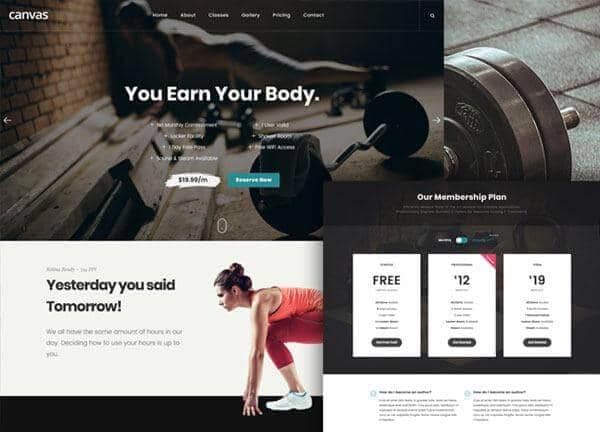
Example output
40
industry templates
1,938+
prompt templates
About 3 minutes
to build a page
Designing a fitness & gym website: what works
Fitness websites need to radiate energy, intensity, and transformation. The design itself is a statement about your brand's culture, whether you're a luxury boutique studio or a high-intensity functional fitness box. Every visual choice, from typography weight to photography style, communicates who your tribe is.
High-Impact Visual Hierarchy
Bold, heavy typography, think 900-weight headlines in all-caps or condensed sans-serif faces, signals strength and commitment. Dark backgrounds with accent colours (electric yellow, vibrant red, neon green) create the intensity your audience expects. Use full-bleed action photography that captures motion and sweat, not posed stock photos.
Class Schedule UX
A filterable weekly timetable is often the highest-traffic page on a fitness website. Make it interactive: filter by class type, trainer, or time of day. Each class listing should include duration, intensity level, and a one-click booking link. Mobile-responsive timetables are critical as most users book on their phones during commutes.
Membership and Pricing Transparency
Gyms that hide pricing online lose leads to competitors who display it. Show membership tiers clearly with what's included (classes, personal training, facilities access). Include a free trial or intro offer prominently: lowering the barrier to entry is the fastest way to fill capacity.
Transformation and Social Proof
Before/after transformation photos (with consent) are uniquely powerful in the fitness space. Pair them with member testimonials that quantify results ('Lost 18kg in 6 months') and trainer credentials. A members counter or active community badge signals that others have committed and gotten results.
Ready to build?
Describe your fitness & gym website in plain English and Canvas Builder builds it, ready to edit and export. No design skills needed.
5 design tips for fitness & gym websites
Use dark, high-contrast design
Dark backgrounds with bright accent colours (neon yellow, electric orange) signal energy and commitment. They also make fitness photography, which often features dramatic lighting, look far more powerful.
Make class booking frictionless
Integrate Mindbody, Glofox, or Pike13 for class booking. Every class on your timetable should link directly to its booking page, never require users to search after clicking.
Feature real transformation stories
Member before/after results (with permission) are your most powerful marketing asset. Dedicate a page or prominent section to transformation testimonials with photos, time periods, and specific outcomes.
Add a free trial or intro offer
Lower the barrier to first visit with a '2 Weeks Free' or 'First Class On Us' offer displayed prominently. Capturing an email in exchange for the offer builds your nurture list for future promotions.
Show trainer credentials and personality
Member-to-trainer relationships are a key retention driver. Individual trainer profile pages with photos, specialties, certifications, and a 'personal training with me' CTA help prospective members find their match.
Try this prompt
Use it as it is, or change the names, colours and sections to match your business.
Create a full-page gym website for 'Iron District CrossFit'. Use a dark background with electric yellow accents and heavy condensed typography. Transparent dark header. Full-bleed hero with a dynamic gym action photo, bold headline 'Forge Your Best Self', and a 'Start Free Trial' CTA. Include a class types section (CrossFit, Strength, HIIT, Olympic Lifting), a 3-tier membership pricing table, transformation testimonials with before/after references, trainer profile cards, and a weekly class schedule section.Frequently asked questions
What pages does a gym website need?
Core pages: Home, Class Timetable, Membership Plans, Trainer Profiles, Facilities Gallery, Free Trial / Join Now, Blog/Nutrition Tips, and Contact/Location. Consider a dedicated page for each major class type (HIIT, Yoga, Pilates) for SEO.
Should I show pricing on my gym website?
Yes. Hiding pricing creates friction and erodes trust. Visitors who can't find pricing often leave and sign up with a competitor. Displaying clear membership options with what's included, even if you offer custom corporate rates separately, increases qualified lead volume.
How do I get more gym members from my website?
Three proven tactics: (1) Offer a free trial or intro class, leads with low commitment convert higher. (2) Add live chat or a fast WhatsApp link for instant responses to enquiries. (3) Collect and display Google reviews with embedded widgets near your Join CTA.
Do I need a mobile app for my gym?
Not necessarily, a mobile-optimised website with an integrated booking system (Mindbody, Glofox) covers the core use case. Apps make sense once you have 200+ members who want push notification class reminders and digital check-in.
What makes a fitness website convert well?
Three things: a powerful hero with a clear outcome statement ('Get Strong. Feel Incredible.'), prominent social proof (transformations + star reviews), and a low-friction first step (free trial, not a full membership). Remove every obstacle between the visitor and their first class.
Related templates
Yoga & Wellness Website Templates
Create beautiful yoga and wellness websites that attract and retain students, with class timetables, teacher bios, workshop listings, and serene visual design that embodies your practice.
View templates →Personal Trainer Website Templates
Build personal trainer websites that book clients, with transformation showcases, training programme details, coaching philosophy, and the bold, results-driven design that motivates action.
View templates →Spa & Retreat Website Templates
Create spa and retreat websites that sell relaxation before guests arrive, with luxurious photography, treatment menus, online booking, and sensory visual design that captures the essence of your sanctuary.
View templates →Build your fitness & gym website in minutes
Describe what you need. Canvas Builder writes production-ready Bootstrap 5 HTML on the Canvas design system, ready to publish or export.