Food Delivery Website Templates
Create food delivery and online ordering websites that keep customers ordering, with tempting menus, real-time delivery tracking features, and seamless mobile ordering flows.
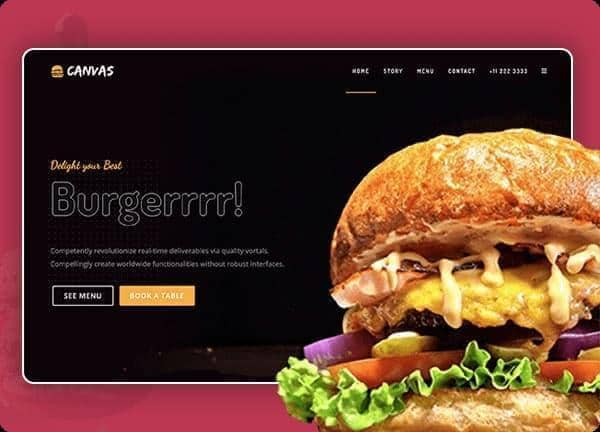
Example output
40
industry templates
1,938+
prompt templates
About 3 minutes
to build a page
Designing a food delivery website: what works
Food delivery websites compete against aggregator platforms like Uber Eats and DoorDash by offering restaurants a direct channel to customers without platform fees. To succeed, the direct ordering experience must match or exceed the usability of aggregators while leveraging the restaurant's brand identity and customer relationships that aggregators commoditise.
Appetite-First Visual Design
Food photography must dominate. Large, hero-scale images of signature dishes, beautifully lit and styled, activate appetite and desire. Vibrant, warm colour palettes (deep orange, rich red, warm yellow) signal flavour and energy. Every category and item should have a high-quality photo: text-only menu items convert at 40% lower rates.
Menu Architecture and Browsing UX
Sticky category navigation allowing instant jump to appetisers, mains, drinks, and desserts is essential. Items should show clear prices, portion descriptions, and dietary badges (vegan, gluten-free, spicy level). Recommended items and 'Most Popular' flags reduce decision paralysis. The ordering flow should never require more than 3 taps from item discovery to cart.
Delivery Zone and Time Transparency
Customers want to know immediately: do you deliver to my area, and how long will it take? A postcode checker in the hero or immediately visible delivery radius map eliminates wasted browsing for out-of-area customers. Real-time estimated delivery windows (not just 'ASAP') and order tracking after placement dramatically improve customer satisfaction.
Loyalty and Reorder Incentivisation
Food delivery is a repeat purchase business. Build loyalty programmes (earn points per order, redeemable for discounts), saved previous orders for one-tap reordering, and personalised recommendations based on order history. These features are unavailable on aggregator platforms and represent the strongest argument for direct ordering.
Ready to build?
Describe your food delivery website in plain English and Canvas Builder builds it, ready to edit and export. No design skills needed.
5 design tips for food delivery websites
Make delivery area visible immediately
Nothing frustrates a hungry user more than building an entire order before discovering you don't deliver to them. A prominent postcode checker or delivery area map at the top of the page eliminates this experience and reduces abandoned orders.
Use food photography for every menu item
Menu items with photos order at 2 to 4x the rate of text-only items. Even simple, consistently-lit phone photography of every dish significantly outperforms a text-only menu for conversion and average order value.
Offer a first-order discount prominently
A first-order discount ('10% off your first order with code WELCOME') displayed prominently in the hero captures first-time customers who are on the fence between ordering direct or using an aggregator they're already familiar with.
Enable saved payment methods and address
Repeat customers converting 3x faster when payment details and delivery address are saved. Build account creation into the confirmation flow, not as a checkout barrier, to enable this for future orders.
Show prep and delivery time estimates per item
Items with different preparation times should show estimated ready times. 'Ready in 15 min' vs 'Allow 35 min for slow-cooked items' sets expectations and reduces post-order complaints. Honest time communication is a trust builder, not a deterrent.
Try this prompt
Use it as it is, or change the names, colours and sections to match your business.
Create a full-page food delivery website for 'Ember Kitchen', an artisan burger and craft beer restaurant offering direct online ordering. Use a dark, moody background with vibrant orange accents and warm lighting photography. Transparent dark header with prominent 'Order Now' CTA. Hero with a stunning burger photo, delivery postcode checker, and current delivery time estimate. Menu categories strip (Burgers, Sides, Drinks, Desserts). Featured items grid with photos, prices, and popular badges. A loyalty programme section. And a downloadable allergen menu link.Frequently asked questions
How do I accept online food orders without using Uber Eats?
Direct ordering platforms like Square Online, Flipdish, Bopple, or GloriaFood allow restaurants to take orders directly from their website with payment processing included. These solutions charge flat monthly fees rather than per-order commissions, significantly improving margins for high-volume operations.
Is it worth having my own ordering website vs just using aggregators?
Yes, if you have an existing customer base or marketing capability to drive direct traffic. Aggregator commissions typically run 15 to 30% per order. Direct ordering requires customer acquisition investment but builds a captive customer database you own, which aggregators prevent. Most successful restaurants use both channels.
What's the best way to promote my direct ordering website?
Five high-ROI tactics: (1) Print direct ordering QR codes on packaging, receipts, and in-store, (2) Email and SMS campaigns to your existing customer database with a direct ordering incentive, (3) Social media posts featuring your direct ordering link with an exclusive discount, (4) Google Business Profile ordering integration, (5) Retargeting ads to site visitors who didn't complete an order.
Should food delivery websites have a blog?
For larger operators, yes: recipe content, behind-the-kitchen posts, and ingredient sourcing stories build brand affinity and generate organic search traffic. For single-location restaurants, prioritising review generation and local SEO (Google Business Profile) typically delivers higher ROI than content marketing.
How do I handle dietary and allergen information on my menu website?
Display dietary badges (Vegan, Vegetarian, Gluten-Free, Contains Nuts) visually on each menu item. Include a full allergen declaration downloadable as PDF. Add a filter option allowing customers to show only items matching their dietary requirements. Allergen transparency is both a legal requirement in many jurisdictions and a significant competitive advantage for health-conscious customers.
Related templates
Restaurant Website Templates
From fine dining to fast-casual, generate beautiful restaurant websites with menus, reservation flows, and bold food photography layouts, all in minutes.
View templates →E-Commerce Website Templates
Build e-commerce websites designed to sell: featuring product grids, featured collections, trust badges, and checkout-optimised layouts for every retail niche.
View templates →Hotel & Hospitality Website Templates
Create hotel and resort websites with immersive photography, room showcases, amenity highlights, and direct booking CTAs that compete with OTAs for every reservation.
View templates →Build your food delivery website in minutes
Describe what you need. Canvas Builder writes production-ready Bootstrap 5 HTML on the Canvas design system, ready to publish or export.