Restaurant Website Templates
From fine dining to fast-casual, generate beautiful restaurant websites with menus, reservation flows, and bold food photography layouts, all in minutes.
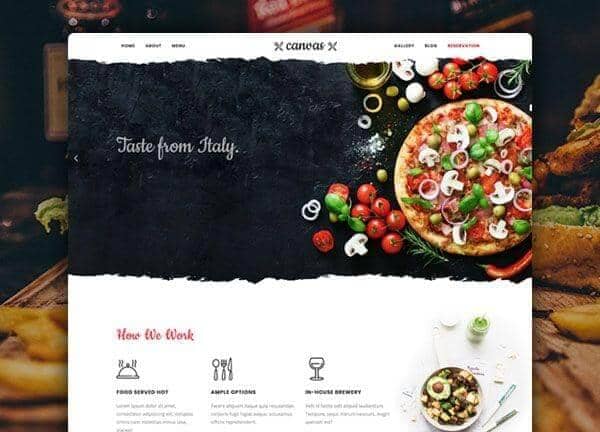
Example output
40
industry templates
1,938+
prompt templates
About 3 minutes
to build a page
Designing a restaurant website: what works
Restaurant websites live and die by appetite appeal. Visitors arrive hungry, visually and literally, and your design must translate the sensory experience of dining into pixels. The best restaurant websites blend atmosphere, accessibility, and conversion without sacrificing either warmth or practicality.
Color Psychology for Food Brands
Warm tones (deep burgundy, terracotta, golden amber) trigger appetite and evoke comfort. Cool whites and dark charcoals work brilliantly as contrast backgrounds, making food photography pop. Avoid heavy blue-dominated palettes in food contexts, as blue is appetite-suppressing.
Photography as the Primary Trust Signal
High-quality dish photography is non-negotiable: blurry or poorly-lit food images cost you bookings. Use full-bleed hero images, allow photos to breathe with generous whitespace, and incorporate short video loops of kitchen prep or plating for premium establishments.
Menu UX: Scannable and Accessible
Online menus should load fast, be filterable by dietary preference, and avoid PDF-only formats which kill SEO and mobile usability. Organise by course or cuisine type, include prices, and highlight signature or seasonal dishes with visual callouts.
Reservation Conversion Architecture
Your CTA hierarchy should be: Reserve → View Menu → Find Us. Place the reservation button in the nav, hero section, and footer. Integrate with OpenTable or Resy, or use a simple enquiry form. Reduce friction: a reservation should never take more than 3 clicks.
Ready to build?
Describe your restaurant website in plain English and Canvas Builder builds it, ready to edit and export. No design skills needed.
5 design tips for restaurant websites
Lead with a full-bleed hero image
Use your most visually striking dish or dining room photo as the hero. A powerful first impression increases time-on-site and reservation intent significantly.
Show opening hours prominently
Hours and location are the most-searched pieces of information for restaurants. Place them in the footer, header, and on a dedicated Contact page with an embedded map.
Mobile-first menu design
Over 70% of restaurant searches happen on mobile. Your menu must be readable without zooming, load quickly, and have tap-friendly section navigation.
Use social proof strategically
Embed a Google Reviews widget or display a curated selection of reviews near the reservation CTA. A 4.8★ rating shown prominently can lift bookings by 20 to 30%.
Add an Instagram feed section
A live or manually-curated Instagram grid builds community and shows real-time activity. It signals that your restaurant is active, popular, and photogenic.
Try this prompt
Use it as it is, or change the names, colours and sections to match your business.
Create a full-page restaurant website for an upscale Italian trattoria called 'Osteria Mia'. Use warm terracotta and deep burgundy tones. Include a transparent dark header, full-screen hero with a candle-lit dining room photo, sticky reservation CTA, a 2-column menu section with starters and mains, a chef story section, and a gallery grid. Footer with opening hours, address, and social links.Frequently asked questions
What pages does a restaurant website need?
A restaurant website needs: Home (with hero + CTA), Menu, Reservations or Contact, About Us, Gallery, and a Location/Hours page. Many also benefit from an Events page for private dining or special nights.
Should I use a PDF for my menu?
No, PDF menus are bad for SEO and mobile users. Use an HTML menu page that Google can index. Your menu items become searchable, which drives organic traffic from people searching for specific dishes in your area.
How do I accept online reservations without a booking system?
A simple contact form with date/time/party-size fields works for smaller establishments. For higher volume, integrate OpenTable (free widget), Resy, or Squarespace Scheduling. These services handle confirmations and reminders.
What's the most important design element for a restaurant website?
Food photography. Nothing else comes close. Invest in a professional shoot before launching your website, even a half-day shoot with 15 to 20 excellent images will outperform any fancy design feature.
How often should I update my restaurant website?
Update menus seasonally, add new photos monthly, and keep opening hours current. A stale website, especially one with old holiday hours, signals to Google and visitors that the business may not be active.
Related templates
Event & Conference Website Templates
Create event and conference websites that drive registrations, with speaker showcases, session schedules, ticket tiers, and urgency-building countdown elements.
View templates →Hotel & Hospitality Website Templates
Create hotel and resort websites with immersive photography, room showcases, amenity highlights, and direct booking CTAs that compete with OTAs for every reservation.
View templates →Food Delivery Website Templates
Create food delivery and online ordering websites that keep customers ordering, with tempting menus, real-time delivery tracking features, and seamless mobile ordering flows.
View templates →Build your restaurant website in minutes
Describe what you need. Canvas Builder writes production-ready Bootstrap 5 HTML on the Canvas design system, ready to publish or export.