Medical & Healthcare Website Templates
Design patient-first healthcare websites that build trust, simplify appointment booking, and clearly communicate your services and specialties.
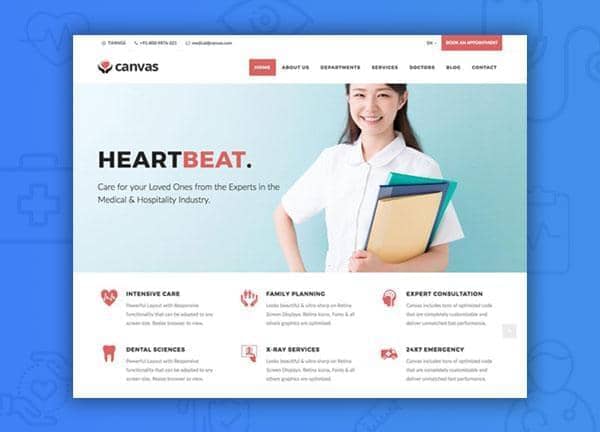
Example output
40
industry templates
1,938+
prompt templates
About 3 minutes
to build a page
Designing a medical & healthcare website: what works
Healthcare websites must balance two competing demands: clinical credibility and warm human approachability. Patients arrive anxious, searching for reassurance. Your design should immediately signal competence through visual professionalism while using photography, tone, and layout to humanise your practice.
Building Immediate Trust Through Design
Clean whites and calming blues or greens are the foundational palette for medical sites. Avoid dark or dramatic design choices: patients equate visual clarity with clinical clarity. Use professional photography of real staff over stock images wherever possible, as authenticity dramatically reduces anxiety.
Information Architecture for Patient Journeys
Patients typically arrive with one of three intentions: book an appointment, find a specific doctor/service, or research a condition. Your IA should serve all three quickly. Use a prominent search or service navigator in the hero, clear specialty listings, and doctor profile pages that include qualifications, photo, and communication style.
Accessibility as a Legal and Ethical Obligation
Medical websites serve elderly patients, people with disabilities, and those in distress. WCAG AA compliance is not optional: use high-contrast text (minimum 4.5:1), large tap targets on mobile (minimum 44px), legible font sizes (minimum 16px body), and never rely on colour alone to convey information.
Appointment Booking UX
Every page should present a clear path to booking. Embed a streamlined booking form or Calendly-style picker, showing available times without requiring login. Offer phone as an alternative prominently: many patients, especially older ones, prefer to call. Confirm appointments via SMS and email.
Ready to build?
Describe your medical & healthcare website in plain English and Canvas Builder builds it, ready to edit and export. No design skills needed.
5 design tips for medical & healthcare websites
Display credentials prominently
List board certifications, hospital affiliations, and years of experience near the top of doctor profile pages. Patients research credentials before booking: make this information easy to find.
Add a symptom or service search
A simple search bar letting patients type a symptom or treatment ('knee pain', 'flu vaccination') and land on the relevant service page reduces bounce rates and improves patient satisfaction.
Include patient testimonials and ratings
Verified reviews from Google or Healthgrades embedded on your site build trust for new patients. Include both star ratings and written testimonials: specificity ('Dr. Smith explained my diagnosis clearly') is more persuasive than generic praise.
Create condition-specific landing pages
Individual pages for key conditions or treatments you specialise in (e.g., 'Lower Back Pain Treatment') rank for long-tail searches and serve patients better than a generic services list.
Mobile-optimise your contact options
Add a sticky 'Call Now' button on mobile: one-tap calling converts far better than expecting mobile users to navigate to a contact page, copy a number, and dial manually.
Try this prompt
Use it as it is, or change the names, colours and sections to match your business.
Create a full-page medical practice website for 'Lakeside Family Clinic'. Use a clean white and teal colour scheme with a solid header. Hero section with split layout: left has headline 'Expert Care, Close to Home', appointment CTA, and a row of trust badges (AHPRA registered, 500+ patients). Right side shows a warm photo of a doctor. Include a services grid (GP, Paediatrics, Women's Health, Mental Health), doctor profile cards, and a patient testimonials section.Frequently asked questions
What pages does a medical practice website need?
Essential pages: Home, Services/Specialties, Doctor/Team Profiles, Appointment Booking, Patient Information (insurance, forms, FAQs), Location & Hours, and Contact. Consider adding a Blog for health education content that drives SEO.
How do I handle patient privacy on a medical website?
Never collect medical information via standard contact forms unless they're encrypted and HIPAA-compliant. Use certified telehealth platforms for any clinical communication. Display your privacy policy prominently and update it to reflect any data collection tools (analytics, forms).
Should a doctor's website have a blog?
Yes, a health information blog is one of the highest-ROI content investments for medical practices. Articles on common conditions, treatments, and preventive care rank for long-tail searches, build authority, and bring in new patients who wouldn't otherwise find you.
How important is Google Business Profile for a medical practice?
Critically important. Most local healthcare searches result in a Google Maps pack listing before any website clicks. Keep your GBP fully updated with accurate hours, services, photos, and respond to all reviews. Embed a Google Map on your website's contact page.
Can I use AI-generated content on a medical website?
With caution. AI-generated health content must be reviewed and approved by a qualified clinician before publishing. Google's helpful content guidelines and YMYL (Your Money, Your Life) standards hold medical content to a very high accuracy bar. Always have a doctor review any AI-drafted health copy.
Related templates
Dental Practice Website Templates
Build dental practice websites that convert anxious patients into bookings, with smile transformations, clear service menus, online scheduling, and gentle reassuring design.
View templates →Pharmacy & Health Store Website Templates
Build pharmacy and health store websites that serve your community, with product catalogues, prescription refill flows, health services information, and the trusted clinical aesthetic patients expect.
View templates →Mental Health & Therapy Website Templates
Build mental health and therapy websites that create safe first steps, with compassionate design, therapist profiles, specialisation pages, and gentle, trust-first booking flows.
View templates →Build your medical & healthcare website in minutes
Describe what you need. Canvas Builder writes production-ready Bootstrap 5 HTML on the Canvas design system, ready to publish or export.