Portfolio Website Templates
Showcase your creative work with portfolio websites designed to impress: featuring masonry grids, project case studies, and layouts that let your work do the talking.
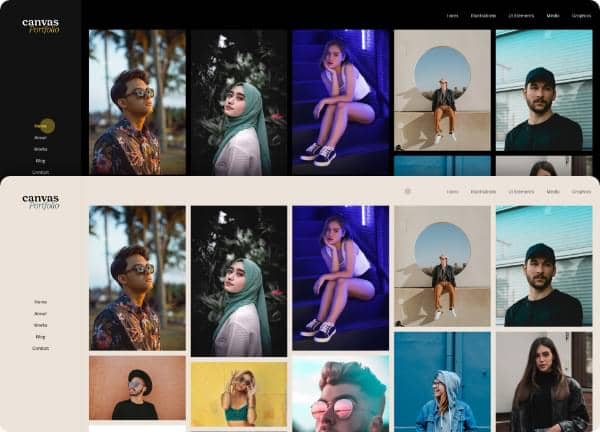
Example output
40
industry templates
1,938+
prompt templates
About 3 minutes
to build a page
Designing a portfolio website: what works
A portfolio website is simultaneously your product demonstration, your CV, and your personality. Unlike other website types, the work itself IS the design: the layout, typography, and interactions should enhance the work without competing with it. The best portfolios feel inevitable: perfectly calibrated to the creator's aesthetic.
Curation Over Comprehensiveness
Show your 8 to 12 strongest pieces, not everything you've ever made. Visitors form an impression from your weakest piece, not your strongest. A ruthlessly curated portfolio of excellent work signals professional judgment and confidence, both of which clients want to hire.
Project Detail Pages That Tell a Story
Each portfolio item should have its own case study page: the brief, your process, key decisions, and the outcome. This depth signals strategic thinking beyond execution. Include client logos, project scope, timeline, and, where possible, measurable results ('Increased conversion rate by 34%').
Typography as Personal Brand
Your choice of typeface is a design statement before any work is even seen. A typographer who uses Comic Sans signals poor judgment; a UI designer whose portfolio uses a distinctive editorial typeface signals refined taste. Choose your type system carefully and apply it with precision.
Contact Accessibility and CTA Clarity
Many portfolios bury their contact information: a fatal conversion mistake. Your email and a contact form should be easy to find from any page. If you're available for freelance work, say so explicitly. If you're seeking full-time roles, include a downloadable resume link. Ambiguity loses you opportunities.
Ready to build?
Describe your portfolio website in plain English and Canvas Builder builds it, ready to edit and export. No design skills needed.
5 design tips for portfolio websites
Open with your most impressive piece
The first project visitors see sets expectations for everything else. Lead with the work you're most proud of: your biggest brand, most impressive result, or most visually striking piece.
Add a brief personal introduction
A 2 to 3 sentence 'About me' in the hero gives context to your work. Include your discipline, experience level, and a distinctive detail that makes you memorable: clients hire people, not portfolios.
Make your portfolio mobile-first
A significant portion of hiring managers and potential clients will view your portfolio on a phone. Test every project page on mobile: full-width images, readable type, and accessible contact buttons are non-negotiable.
Include your process, not just outcomes
Show sketches, wireframes, and iteration, not just polished final deliverables. Clients want to hire a process as much as a result. 'How you think' is often more valuable than 'what you've made'.
Update it every 3 to 6 months
A portfolio with work from 3 years ago signals you haven't grown. Audit your portfolio regularly, replace weaker pieces with stronger recent work, and ensure your About section reflects your current direction and availability.
Try this prompt
Use it as it is, or change the names, colours and sections to match your business.
Create a full-page portfolio website for a senior UX designer named Alex Chen. Use a minimal white background with black typography and a single lime green accent colour. Include a bold split hero with name, title, and a large project thumbnail. A filterable masonry portfolio grid (design, branding, web categories). Individual project cards with hover overlays. An about section with photo, bio, and skills list. A client logo strip, and a prominent contact section with email and social links.Frequently asked questions
How many projects should a portfolio website include?
For most creatives, 8 to 12 projects is the sweet spot. Enough to show range and depth, few enough that every included piece is strong. Hiring managers spend an average of 3 to 5 minutes on a portfolio: curate for impact, not volume.
Should my portfolio website have a blog?
Yes, if you'll actually write for it. A blog with case studies, process posts, or industry insights demonstrates expertise, improves SEO, and gives clients a sense of how you think. An empty or abandoned blog is worse than no blog.
What's the best way to show work under NDA?
You can still showcase restricted work by: blurring or abstracting client branding while showing the UX/design system, describing the project type and your role without specifics, or asking clients for written permission to showcase internal work. Many will agree to restricted display.
Do I need a custom domain for my portfolio?
Yes. yourname.com signals professionalism and is easily memorable. A behance.net/yourname or wix.com/site portfolio works for early careers but signals that your craft doesn't extend to your own digital presence.
How do I make my portfolio stand out?
Three things: ruthless curation (only show excellent work), deep case studies (show thinking, not just output), and a memorable personal voice in your writing. Most portfolios show work without context: the ones that explain the problem and celebrate the process are the ones that win jobs.
Related templates
Agency Website Templates
Build agency websites that impress prospects and win pitches: featuring case study showcases, service capabilities, team culture, and results-focused conversion design.
View templates →Photography Website Templates
Build photography websites that showcase your vision, with full-screen image galleries, client booking forms, print shop integration, and portfolio layouts that make your work unforgettable.
View templates →Digital Agency Website Templates
Build digital agency websites that win pitches and attract inbound, with service showcases, work portfolio, client results, and the sophisticated design that tells prospects you understand the internet.
View templates →Build your portfolio website in minutes
Describe what you need. Canvas Builder writes production-ready Bootstrap 5 HTML on the Canvas design system, ready to publish or export.