Photography Website Templates
Build photography websites that showcase your vision, with full-screen image galleries, client booking forms, print shop integration, and portfolio layouts that make your work unforgettable.
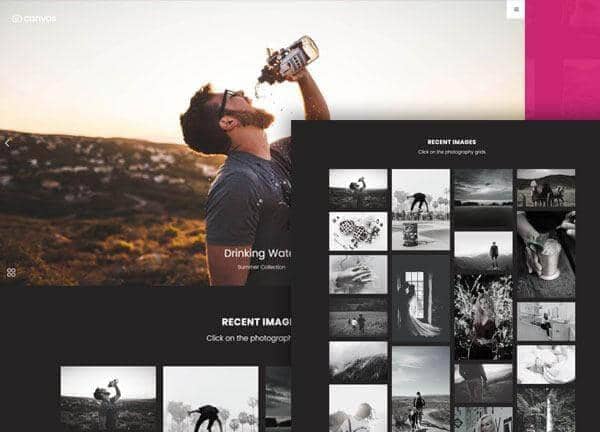
Example output
40
industry templates
1,938+
prompt templates
About 3 minutes
to build a page
Designing a photography website: what works
Photography websites have one fundamental design rule: the photos must dominate. Every design choice (the amount of white space, the navigation style, the typography weight) must serve the singular goal of making images look as powerful as possible. Minimalist restraint is almost always the correct approach.
Minimal Chrome, Maximum Image
Remove everything that competes with photographs: dense navigation, coloured backgrounds, decorative borders. A black or very dark background makes colour photography pop. White space, generous white space, allows images to breathe and be experienced. A photography website that looks 'empty' is usually doing exactly the right thing.
Gallery Architecture and Categorisation
Organise galleries by shoot type (wedding, portrait, commercial, landscape) and allow clients to navigate intuitively. Full-screen lightboxes, keyboard navigation, and smooth transitions respect the viewing experience. Lazy-load high-resolution images for performance, but never compromise visible image quality.
Client Proofing and Private Galleries
For commercial and wedding photographers, password-protected client galleries for photo selection are a significant value-add and workflow tool. Clients who can review and select images online have better experiences and refer more. This feature differentiates professional photographers from hobbyists.
Booking and Pricing Page Design
Photography pricing pages should position packages around experience outcomes ('Elopement Collection', 'Full Wedding Day Coverage') rather than just technical specifications ('200 images, 2 hours'). Include a booking enquiry form with date, event type, and location fields. A response-time commitment ('I respond within 24 hours') reduces enquiry anxiety.
Ready to build?
Describe your photography website in plain English and Canvas Builder builds it, ready to edit and export. No design skills needed.
5 design tips for photography websites
Use a dark background for the main gallery
Photographs, especially colour-rich work, look dramatically more powerful against dark charcoal or black backgrounds than white. This is why museums and galleries use dark walls. Apply the same logic to your website's gallery sections.
Keep navigation invisible until needed
A fixed minimal header with just your name and a few links, or a hamburger menu that slides in from the side, removes visual noise from the gallery experience. The goal is to approximate the focus of a physical gallery visit.
Show your shooting style, not just outcomes
Behind-the-scenes content, blog posts about your creative process, and 'how I shot this' breakdowns build the personal brand and relationship that lead to bookings, especially for wedding and portrait photography where personality fit matters as much as style.
Feature a signature collection prominently
Curate a 'Best of' or 'signature work' gallery as the centrepiece of your home page, not a generic slideshow. Visitors who immediately see your strongest, most representative work are more likely to enquire than those who have to navigate into galleries to find your best images.
Include location and travel information
Many photographers travel for shoots. Clearly state your home base and willingness to travel, with or without travel fees. Many clients will specifically search for photographers willing to travel to a destination, and this information isn't always easy to find.
Try this prompt
Use it as it is, or change the names, colours and sections to match your business.
Create a full-page wedding photography website for 'James Hartley Photography'. Use a dark charcoal and white palette with warm gold accents. Simple dark no-sticky header with photographer name as logo. Full-bleed immersive hero with a stunning wedding image and minimal text overlay. A curated portfolio grid in a masonry layout. An about section with photographer photo and personal narrative. A packages/investment section (Elopement, Half Day, Full Day, Destination). Client love quotes. And a booking enquiry form with response time promise.Frequently asked questions
What pages does a photography website need?
Core pages: Home (curated portfolio hero), Portfolio/Galleries (by category), About, Services/Investment, Contact/Booking, and a Blog for behind-the-scenes content. Wedding photographers also benefit from a Wedding FAQ page and testimonial page. Commercial photographers need a client list and commercial licensing information page.
How many photos should I show on my photography website?
Less is more. Show 20 to 40 of your absolute best images in your main portfolio, not hundreds. Curate ruthlessly. A viewer who sees 40 consistently excellent images thinks 'this photographer is consistently excellent.' A viewer who sees 200 images, including weaker ones, thinks 'this photographer is inconsistent.'
Should I watermark my photos on my website?
For portfolio display, no: watermarks damage the visual experience and signal insecurity. Your photos aren't being stolen from portfolio thumbnails. For client delivery galleries with selectable images, watermarking before purchase is standard practice.
What's the best platform for a photography website?
Dedicated photo platforms like Squarespace, Format, or Pixieset provide beautifully designed templates optimised for photography workflows including client galleries. For those wanting full creative control, a custom HTML/CSS build using Canvas produces professional results without platform constraints.
How do I price photography packages on my website?
Show investment guides rather than exact prices where your work involves custom scope. Provide starting-from prices and a clear statement that 'final pricing depends on scope, date, and location' to pre-qualify enquiries. For standardised sessions (portrait mini sessions, headshots), full pricing transparency converts much better.
Related templates
Portfolio Website Templates
Showcase your creative work with portfolio websites designed to impress: featuring masonry grids, project case studies, and layouts that let your work do the talking.
View templates →Salon & Beauty Website Templates
Create beautiful salon and beauty websites that fill your appointment book, with service menus, online booking, stylist portfolios, and luxe visual branding.
View templates →Wedding Services Website Templates
Create beautiful wedding service websites that attract couples, with real wedding galleries, service packages, testimonials, and romantic visual design that matches the magic of the day.
View templates →Build your photography website in minutes
Describe what you need. Canvas Builder writes production-ready Bootstrap 5 HTML on the Canvas design system, ready to publish or export.