Construction Website Templates
Build construction and building company websites that win contracts, with project portfolios, service showcases, trade credentials, and client testimonial sections.
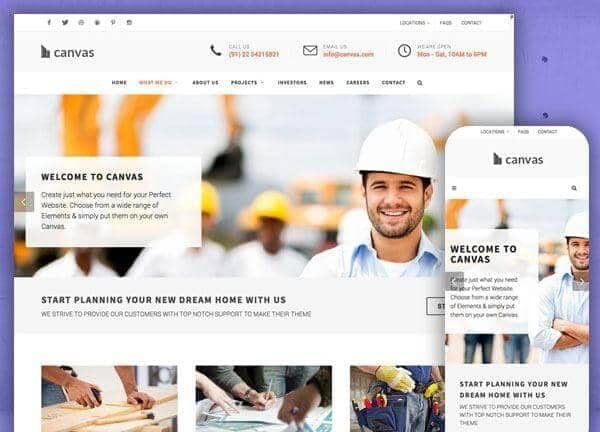
Example output
40
industry templates
1,938+
prompt templates
About 3 minutes
to build a page
Designing a construction website: what works
Construction websites must project competence, reliability, and scale. Potential clients, whether residential homeowners or commercial project managers, need to quickly assess whether you can handle their project, have the track record to be trusted, and are professional enough to communicate clearly throughout a long engagement.
Portfolio as the Primary Sales Tool
Completed project photos and case studies are the most effective content on any construction website. Organise by project type (residential, commercial, industrial) with before/after sequences where possible. Include project scale (sqm, value range), timeline, and client testimonials alongside each project.
Credibility Through Certifications and Associations
Display licences, insurance details, industry association memberships, and safety certifications prominently. In trades and construction, clients specifically look for these before making contact: they de-risk the engagement. A dedicated 'Credentials' or 'Why Choose Us' section with logo-style certification badges builds immediate confidence.
Service Area Clarity
Define your geographic service area explicitly: include it in the hero or a dedicated service area map. Construction websites rank strongly for local searches. Creating separate pages for each major service area (suburb or region-level) is one of the highest-ROI SEO investments for trade businesses.
Quote Request and Enquiry Friction Reduction
Most construction enquiries start with a quote request. Your quote form should be straightforward: project type, rough scope, location, timeline, and contact details. Offer phone, email, and form options. Promising a response timeframe (24-48 hours) and displaying it on the form reduces enquiry abandonment significantly.
Ready to build?
Describe your construction website in plain English and Canvas Builder builds it, ready to edit and export. No design skills needed.
5 design tips for construction websites
Use before/after project photography
Before-and-after comparisons are uniquely compelling for construction and renovation. They demonstrate transformation capability and give potential clients a concrete sense of what's possible. Invest in professional photography of your completed projects.
Display all licences and insurances visibly
Licence number, public liability insurance, workers compensation, and industry association badges should be in the footer and on your Contact/Quote page. These are decision-making requirements for many clients: make them easy to verify.
Create project type landing pages
Individual pages for 'Kitchen Renovations', 'Home Extensions', 'Commercial Fitouts' etc. each target specific search queries and allow you to tailor the project gallery, testimonials, and FAQ to that specific buyer intent.
Feature a 3-step process section
Many potential clients are intimidated by the complexity of construction projects. A clear 'How it works' section (Consultation → Design & Quote → Build) reduces anxiety and makes the first step, making contact, feel manageable.
Add Google Reviews widget
For residential construction, Google Reviews are the most trusted source of social proof. An embedded or linked Google rating and recent reviews near your contact CTA are often the deciding factor for homeowners choosing between shortlisted builders.
Try this prompt
Use it as it is, or change the names, colours and sections to match your business.
Create a full-page construction company website for 'Apex Build Group', a commercial and residential builder. Use dark charcoal and industrial orange accents. Small header (header-size-sm). Hero with large project photo background, 'Building Excellence Into Every Project' headline, Get a Quote CTA, and a row of credibility stats (28 years, 500+ projects, $0 safety incidents). A services grid (Residential, Commercial, Industrial, Renovations). Project portfolio with before/after pairs. Certifications strip. Client testimonials. And a quote request form.Frequently asked questions
What pages does a construction company website need?
Core pages: Home, Services (general + individual service type pages), Project Portfolio, About/Our Team, Why Choose Us/Credentials, Service Areas, Testimonials, FAQ, Contact/Get a Quote. Residential and commercial builders often benefit from separate landing pages for each audience.
How do I get more enquiries from my construction website?
Three high-impact improvements: (1) Add project photos to every page where possible (sites with project photography get 3x more enquiries, (2) Display your licence and insurance prominently) it's a filtering requirement, (3) Add a fast-response quote request form with a clear turnaround commitment.
Should a builder have a blog?
Yes, especially for residential builders. Blog posts like 'How much does a kitchen renovation cost in [city]?' or 'Home extension planning guide' capture homeowners in research mode before they've chosen a builder. This top-of-funnel content builds trust and generates warm leads.
How do I showcase projects I can't photograph yet?
Use rendered visualisations, progress shots, architectural drawings, or client-provided photos where professional photography isn't available. Context about project scope, challenges, and outcomes can compensate for limited photography.
How important are online reviews for a construction business?
Extremely important. For residential construction especially, referrals and reviews are the primary acquisition channel. A structured review request process, send a Google Review link upon project completion, is one of the highest-ROI marketing activities for any trade business.
Related templates
Real Estate Website Templates
Create professional real estate websites with property search, agent profiles, neighbourhood guides, and high-converting lead capture, built for buyers and sellers alike.
View templates →Interior Design Website Templates
Create interior design websites that win dream projects, with immersive project portfolios, design philosophy sections, client process guides, and editorial-quality visual presentation.
View templates →Electrician & Trade Website Templates
Build electrician and trade business websites that win jobs, with clear service listings, licence credentials, project galleries, and fast-response quote request forms.
View templates →Build your construction website in minutes
Describe what you need. Canvas Builder writes production-ready Bootstrap 5 HTML on the Canvas design system, ready to publish or export.