Salon & Beauty Website Templates
Create beautiful salon and beauty websites that fill your appointment book, with service menus, online booking, stylist portfolios, and luxe visual branding.
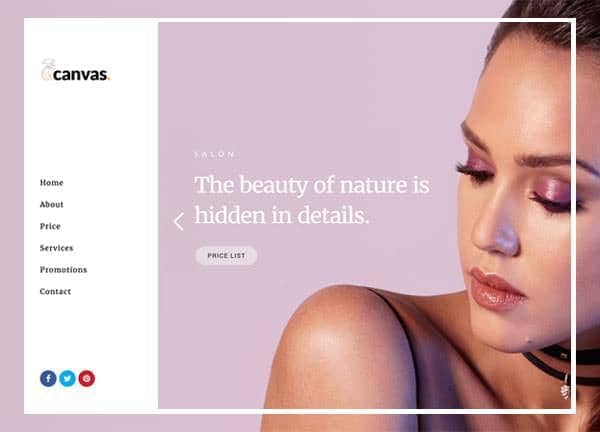
Example output
40
industry templates
1,938+
prompt templates
About 3 minutes
to build a page
Designing a salon & beauty website: what works
Beauty websites are brand statements as much as business tools. Clients choose salons as much for the aesthetic and atmosphere as for the technical skills: your website must communicate your salon's personality, quality level, and style DNA in the first few seconds. The visual identity of your website IS a preview of the in-salon experience.
Aesthetic Alignment as Brand Trust
A high-end blow-dry bar should not have the same website as a nail art studio: the colour palettes, typography, photography style, and overall aesthetic must match what clients will experience when they walk through the door. Mismatch between website aesthetic and in-salon experience is a trust-destroying surprise.
Portfolio and Transformation Photography
Hair, nail, and beauty results are inherently visual. A well-organised gallery of client transformations, ideally with stylist credit, is your most powerful booking conversion tool. Instagram-style grid layouts work brilliantly for beauty portfolios. Video content (timelapse colour transformations, nail art tutorials) performs exceptionally on social-linked landing pages.
Service Menu and Pricing Transparency
Online service menus with clear pricing reduce appointment abandonment and pre-qualification friction. Organise by service category (cuts, colour, treatments) with duration, description, and price range. Acknowledge price variability ('from $X, final price confirmed at consultation') honestly rather than hiding pricing entirely.
Online Booking Friction Reduction
Modern clients expect to book online at midnight, not call during business hours. Integrate Fresha, Vagaro, Square Appointments, or Timely for 24/7 booking. The booking CTA should be in the header and hero. Confirmation SMS and reminder messages reduce no-show rates significantly.
Ready to build?
Describe your salon & beauty website in plain English and Canvas Builder builds it, ready to edit and export. No design skills needed.
5 design tips for salon & beauty websites
Make your Instagram gallery a design feature
Salons with strong Instagram presence should feature a live feed or curated gallery on the home page. It serves as social proof, shows current style trends, and demonstrates active service output, all simultaneously.
Introduce your stylists individually
Many salon clients are loyal to a specific stylist, not the salon. Individual stylist profiles with photo, specialities, booking link, and Instagram handle reduce the barrier for first-time clients and build stylist-client relationships that drive retention.
Offer online booking with real-time availability
A booking system showing actual available time slots rather than a 'request a time' form converts 3 to 5x better. Real-time availability reduces back-and-forth and captures clients at the moment of intent.
Showcase your signature services
Every salon has signature offerings that differentiate it. Create a featured section or hero callout for your signature service ('The Studio Gloss Treatment', 'Our Custom Balayage Technique') with before/after photos and an explained process.
Display cancellation policy clearly
Post your cancellation and no-show policy clearly on the booking page and in booking confirmations. Clients who understand the policy upfront are less likely to dispute charges, and you reduce the administrative burden of last-minute cancellations.
Try this prompt
Use it as it is, or change the names, colours and sections to match your business.
Create a full-page hair salon website for 'Atelier Studio', a premium hair studio. Use a minimalist palette of warm cream, soft rose gold, and rich charcoal. Include a clean full header, a hero with a stunning hair transformation photo and 'Your Signature Look, Crafted Here' headline. An online booking CTA. A services grid with pricing (Cut, Colour, Balayage, Treatments, Blowouts). An Instagram-style gallery grid. Individual stylist profiles with specialty tags. Client review cards. And a gift voucher section.Frequently asked questions
What pages does a salon website need?
Essential pages: Home, Services/Price List, Meet the Team, Gallery, Online Booking, About the Salon, FAQ (products, parking, cancellation), and Contact/Location. Gift voucher and loyalty programme pages add significant revenue opportunities.
Should I show prices on my salon website?
Yes, with appropriate caveats for variable services. 'Colour from $X: price confirmed at consultation' is better than hiding pricing entirely. Clients who don't know your approximate price range won't book a consultation to find out. Transparency attracts the right clients.
What booking system is best for salons?
Fresha (formerly Shedul) is excellent for independent salons with its free core plan. Vagaro, Timely, and Square Appointments are strong alternatives with different feature mixes. The key criteria: 24/7 online booking, SMS reminders, and easy management of multiple stylists' schedules.
How do I use my website to get more salon clients?
Three high-impact tactics: (1) Create individual landing pages for high-value services ('Balayage Specialist [City]') targeting local service searches, (2) Build a review generation strategy, ask satisfied clients for Google reviews at checkout, (3) Run a first-visit special offer prominently on your home page.
How do I show my salon's work online without a professional photographer?
Consistent, well-lit phone photography works well for salons: a ring light and a plain background (a white wall works) transforms before/after shots. Consistency of format and lighting matters more than camera quality. A 'house style' for your portfolio photography makes your grid look polished even with phone shots.
Related templates
Photography Website Templates
Build photography websites that showcase your vision, with full-screen image galleries, client booking forms, print shop integration, and portfolio layouts that make your work unforgettable.
View templates →Yoga & Wellness Website Templates
Create beautiful yoga and wellness websites that attract and retain students, with class timetables, teacher bios, workshop listings, and serene visual design that embodies your practice.
View templates →Spa & Retreat Website Templates
Create spa and retreat websites that sell relaxation before guests arrive, with luxurious photography, treatment menus, online booking, and sensory visual design that captures the essence of your sanctuary.
View templates →Build your salon & beauty website in minutes
Describe what you need. Canvas Builder writes production-ready Bootstrap 5 HTML on the Canvas design system, ready to publish or export.