Co-working Space Website Templates
Build co-working space websites that fill your desks, with virtual facility tours, membership tier options, community highlights, and booking-optimised design for freelancers and teams.
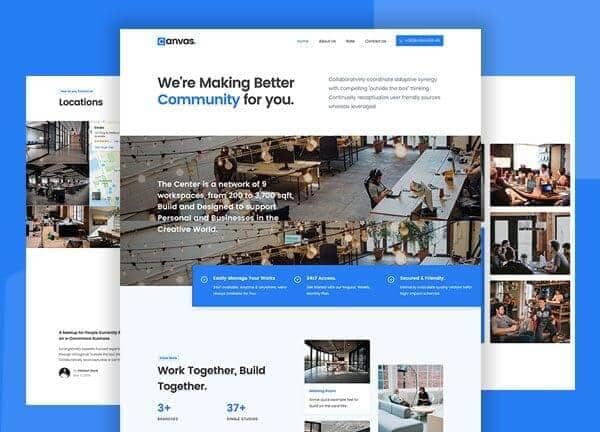
Example output
40
industry templates
1,938+
prompt templates
About 3 minutes
to build a page
Designing a co-working space website: what works
Co-working websites sell community and environment as much as desk space. The rise of remote work has made co-working spaces competitive and diverse, from budget hot desks to premium private suites. Your website must clearly communicate the atmosphere, community, and productivity benefits that justify choosing your space over working from home.
Atmosphere and Community Visualisation
Photographs showing real members working, collaborating, and socialising in your space are far more persuasive than empty interior shots. The human element, people genuinely enjoying the space, communicates community culture, which is the primary differentiator for co-working beyond price. Capture the energy of a productive, sociable workspace.
Membership Tier Clarity
Co-working pricing models are notoriously complex. Simplify: hot desk, dedicated desk, private office, and meeting room access as clear tiers with explicit inclusions (printing, coffee, internet speed, access hours, guest passes) and pricing. A comparison table of tiers is the single most effective conversion tool on co-working websites.
Facility and Amenity Showcasing
Specific amenities drive specific member segments: fast fibre internet and phone booths for video-call-heavy remote workers; podcast recording studio for content creators; event space for community events; barista coffee for those who value perks. Create visual amenity callout sections targeted to your primary member personas.
Trial and Tour Lead Generation
Co-working spaces have a high-consideration purchase cycle, most people want to try before committing to a membership. A prominent 'Book a Free Day Pass' or 'Schedule a Tour' CTA is the primary conversion mechanism. Lower the commitment: a free trial day creates warm leads who've experienced the space, and these convert to members at 30 to 50% rates.
Ready to build?
Describe your co-working space website in plain English and Canvas Builder builds it, ready to edit and export. No design skills needed.
5 design tips for co-working space websites
Offer a free day pass as the primary CTA
Co-working is a tactile decision: people need to experience the space before committing. A free trial day pass is your most powerful conversion offer and typically converts 30 to 50% of users who take it up. Make it the most prominent CTA on the home page.
Show your community, not just your space
Member spotlight features, community events photography, and 'Our members' sections showing the types of businesses and professionals in your space signal that your community is the right fit for a prospective member's tribe and work style.
Make meeting room booking seamless
Meeting rooms are a significant revenue driver and daily operational need. A clearly visible meeting room booking link with real-time availability in the nav or header converts members and non-members alike for one-off needs that often lead to full memberships.
Feature enterprise and team plans separately
Teams of 5 to 15 people are an increasingly important co-working segment. A dedicated enterprise page explaining private suite options, custom fit-out capability, SLAs, and enterprise billing attracts this higher-value segment with messaging tailored to their decision-making process (budget approval, IT requirements, legal).
Leverage your location advantages
Co-working decisions are fundamentally local. Create content that highlights your proximity to transport hubs, cafes, and business districts. 'Central location, 2 minutes from [major station]' and a map prominently on the home page are conversion drivers for location-sensitive decision-makers.
Try this prompt
Use it as it is, or change the names, colours and sections to match your business.
Create a full-page co-working space website for 'Common Ground', a creative co-working hub. Use a warm, energetic palette of deep terracotta, warm cream, and dark forest green. Clean full header with booking CTA. Hero with a vibrant workspace photo showing real people working, headline 'Where Good Work Happens', and free day pass CTA. Membership tier comparison table (Hot Desk, Dedicated, Private Office, Virtual). Amenities section with icons (1Gbps fibre, phone booths, podcast studio, rooftop). Community events section. Member testimonials. Location map. And a tour booking form.Frequently asked questions
What pages does a co-working website need?
Core pages: Home, Plans & Pricing, Facilities/Amenities, Virtual Tour or Photo Gallery, Community (events, member stories), Location & Access, Meeting Rooms, Enterprise/Teams, FAQ, and Book a Tour. Event space pages and day pass booking pages are valuable additions.
How do I differentiate my co-working space from competitors?
Differentiation comes from one or more of: specific community niche (health-tech founders, creative freelancers, female entrepreneurs), standout amenity (recording studio, roof terrace, premium café bar), location superiority, design quality, event programming, or member services (admin support, business address, mail handling).
Should I offer day passes or try to sell memberships only?
Both. Day passes serve the trial-conversion funnel and provide flexible revenue from occasional users. The goal is to convert day pass users into members: a structured nurture sequence (email follow-up with a member discount after the trial day) significantly improves this conversion.
What booking system works for co-working spaces?
Dedicated co-working management platforms like Nexudus, OfficeRnD, or Cobot provide membership management, booking, billing, access control integration, and community features in one platform. These integrate with your website via embeddable booking widgets and API-driven member portals.
How do I market a co-working space locally?
Most effective channels: (1) Google Business Profile optimisation for 'co-working space + suburb' searches, (2) Partnerships with local business networks, chambers of commerce, and startup communities, (3) LinkedIn content from the founders and community managers, (4) Local PR through business publications, (5) Referral incentive for existing members.
Related templates
Agency Website Templates
Build agency websites that impress prospects and win pitches: featuring case study showcases, service capabilities, team culture, and results-focused conversion design.
View templates →Startup Website Templates
Build startup websites that attract users, investors, and press: featuring product demos, founder credibility, waitlist capture, and clean modern design that signals serious execution.
View templates →Consulting Website Templates
Build consulting websites that attract premium clients, with expertise positioning, case study showcases, speaking credentials, and authority-first design that commands higher fees.
View templates →Build your co-working space website in minutes
Describe what you need. Canvas Builder writes production-ready Bootstrap 5 HTML on the Canvas design system, ready to publish or export.