Portfolio Website Examples
A portfolio website is your most important sales tool as a creative professional. The best examples are simultaneously a demonstration of skill and a conversion tool: they show the work, communicate the process, and make it easy to hire. Here's what makes portfolio sites exceptional.
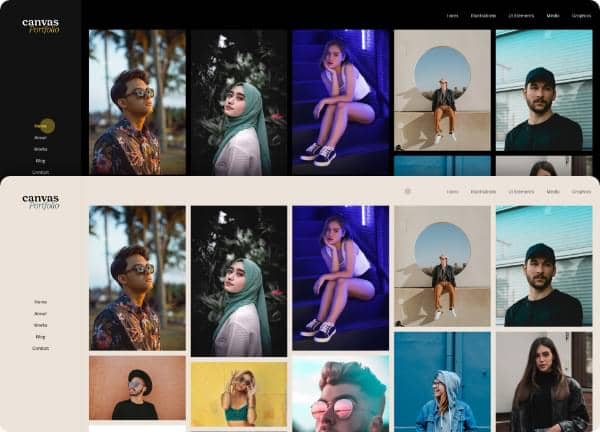
From the Canvas template
The Canvas design system that Canvas Builder builds on
A preview of a Canvas template demo for this niche. Canvas Builder generates new layouts in the same Bootstrap 5 system from your own description, so your page is built for your business rather than copied from a demo.
See portfolio website templatesWhat makes a great portfolio website?
Work first, bio second
The best creative portfolios lead with the work itself, not an 'About Me' page. Visitors want to see what you do before they care who you are. Lead with your strongest 4 to 6 projects in a grid or featured layout.
Case studies over screenshots
Top portfolio sites go beyond showing the final output. They explain the brief, the process, the decisions made, and the results achieved. A case study page demonstrates thinking, which is what clients are actually hiring.
Personality in the micro-copy
The best portfolios have a distinct voice, even in headings and button labels. 'See my work' feels generic. 'Projects I'm proud of →' communicates character. Micro-copy is a free opportunity to show personality.
Contact friction as low as possible
One contact form field (email + message) is enough. The best portfolios surface the contact CTA in the navigation and immediately after every project. Never make a potential client hunt for how to reach you.
Common portfolio website design patterns
The visual styles most commonly used across top portfolio website sites.
Dark editorial
Black or very dark background, white typography, full-bleed project imagery. Signals creative confidence and a cinematic aesthetic.
Used by: Motion designers, photographers, filmmakers, brand agencies
Clean grid layout
White background, project thumbnails in a structured grid, minimal navigation. Work is the focus. Scales well as projects accumulate.
Used by: UI/UX designers, illustrators, web developers
Single-scroll narrative
One long-scrolling page that tells a story (work, process, about, contact) in sequence. Creates a guided journey through the portfolio.
Used by: Freelance designers, copywriters, brand strategists
Brutalist/typographic
Bold typography as design element, unconventional layouts, limited imagery. Makes a strong visual statement and is memorable.
Used by: Experimental designers, art directors, typographers
Must-have elements
- 4 to 8 featured projects immediately visible
- Case study pages with brief, process, and results
- Clear headline stating who you are and what you do
- Contact CTA in the navigation
- Client list or logos (social proof)
- Testimonials with full name and company
- Services or specialisations section
- About page with professional photo
- Links to live work (not just screenshots)
Common mistakes to avoid
- Too many projects: quality beats quantity, keep your best 6 to 10
- No case studies: screenshots without context are weak
- Generic headline ('I'm a designer' tells nobody anything specific)
- Contact page requiring too many form fields
- No testimonials: portfolios without social proof leave visitors guessing
- Slow-loading project images, no lazy loading or optimisation
Describe your own portfolio website
Edit the prompt or pick a starting point. Canvas Builder builds it live on the Canvas design system.
Frequently asked questions
How many projects should a portfolio website include?
Quality beats quantity. 6 to 10 strong projects outperform 20 mediocre ones. If you're just starting, 3 to 4 excellent case studies are enough. Curate ruthlessly: every project you show should be work you'd be proud to repeat.
Should a portfolio website include pricing?
Most creative portfolios don't include pricing: projects vary too much. A 'Starting from' range on a services page helps pre-qualify leads without locking you in. If you offer fixed-price packages (e.g. branding packages), list them.
Do I need a blog on my portfolio site?
Only if you'll maintain it. An empty blog or one with the last post from 2022 signals neglect. If you enjoy writing, a blog builds SEO and authority. If not, skip it: the portfolio itself is the content.
Generate your own portfolio website
Describe your portfolio website and Canvas Builder generates production-ready Bootstrap 5 HTML in about 3 minutes. No designer, no subscription.
More website examples
Hospitality
Restaurant Website ExamplesThe best restaurant websites do one thing above all else: make you hungry. They translate the sensory experience of dining (warmth, atmosphere, taste) into a visual experience that compels visitors to book a table or place an order. Here's what separates great restaurant websites from forgettable ones.See examplesTechnology
SaaS Landing Page ExamplesSaaS landing pages are conversion machines: every element exists to move a visitor from 'interested' to 'signed up'. The best examples communicate value in seconds, remove every possible friction point, and use social proof precisely where doubt is highest. Here's what makes the top performers stand apart.See examplesBusiness
Agency Website ExamplesAgency websites have one of the hardest conversion jobs in web design: they must simultaneously showcase creative credibility, communicate strategic capability, and generate qualified leads. The best agency sites do all three: here's how.See examples